Remote Work Community: Thrive & Connect in 2026
Feeling isolated? Discover the power of a remote work community. Find your tribe & boost your career and well-being. Your guide starts here for 2026.
You probably know the feeling. Your calendar is full, your Slack is noisy, your team is “connected,” and yet the workday ends with a strange sense that nobody really knows you. You've had plenty of interaction and very little community.
That gap is what is generally meant when individuals start looking for a remote work community. Not another place to collect unread notifications. Not a directory of random networking events. They're looking for a group where people remember their name, answer useful questions, share real opportunities, and make remote work feel less thin.
Remote work is no longer a side arrangement. In the U.S., the Bureau of Labor Statistics reported that 35.5 million people teleworked or worked at home for pay in Q1 2024, equal to 22.9% of people at work, according to the BLS telework trends report. The challenge now isn't whether remote work is real. It's whether the social layer around it is good enough.
What a Remote Work Community Really Means
You join a new remote group with good intentions. The welcome channel is busy, the emoji reactions are flying, and there are 40 channels you might someday read. Three weeks later, you have not built a single relationship you would trust for advice, a referral, or an honest conversation about work.
That gap is the definition that matters.
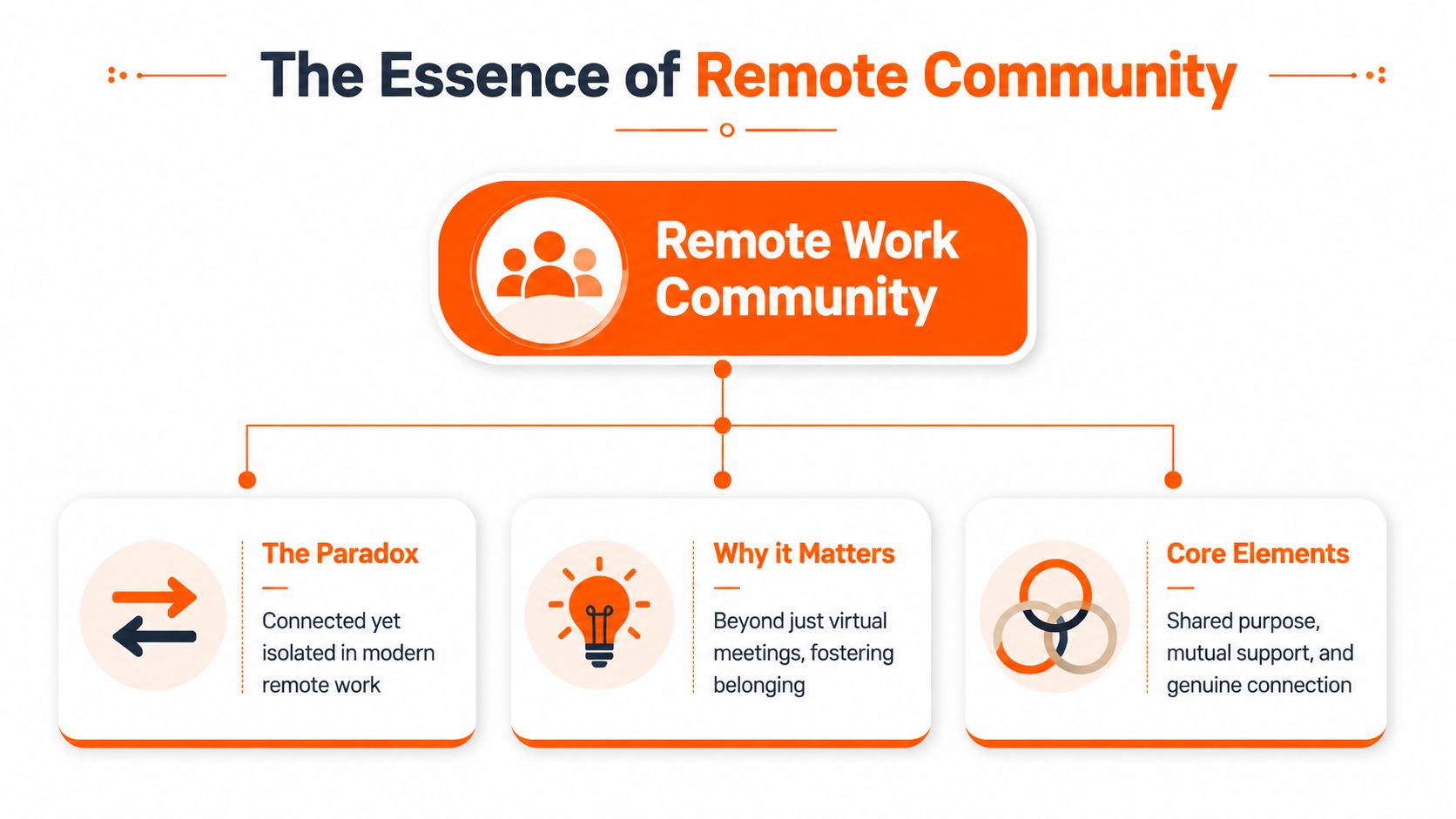
A remote work community is not a Slack workspace, Discord server, or coworking membership by itself. It is a group with enough trust, relevance, and repetition that people keep coming back because the relationships are useful and real.
The problem isn't access
Remote workers usually have plenty of places to sign up. What they lack are spaces that earn a place in their week. In practice, that means a community has to do more than stay active. It has to help people solve problems, build familiarity, and feel known well enough that they want to return.
I have joined small groups that changed my work and large ones that became background noise. The difference was rarely the platform. It was whether the group created enough safety and structure for people to ask candid questions, share opportunities, and follow through with each other.
That is also where many communities fail. They add one more screen, one more login, and one more stream of low-value chatter. The Upjohn Institute's discussion of remote work and community points to the broader stakes around belonging, burnout, and retention. A community should reduce the social thinness of remote work, not add to it.
A good remote community works as a third space. It sits outside your manager relationship and outside home life. It gives you room to test an idea before it is polished, ask for help without feeling exposed, and grow your professional network through repeated interactions instead of random cold outreach.
Practical rule: If a community makes you feel busier but not more supported, leave it or redesign it.
Outcomes matter more than activity
A crowded feed can hide a weak community. I would rather join a group of 60 people who reliably answer each other than a group of 6,000 where every post disappears in minutes.
Healthy remote communities usually share a few traits:
- Clear purpose: Members know why the group exists and who it is for.
- Good stewardship: Someone sets the tone, welcomes new people, and limits self-promotion.
- Reciprocity: People contribute before they pitch. They answer, introduce, and follow up.
- Participation that respects energy: The group offers ways to join in without expecting everyone to be online all day.
That last point matters more than many builders realize. Quantity of channels is easy to create. Quality of connection takes design. Weekly prompts, small peer circles, office hours, and thoughtfully run meetups usually do more for belonging than adding five new channels ever will.
What community should feel like
Use a simple test after a month. Can you name a few people in the group without checking the member list? Have you had one conversation that changed how you work? Would you feel comfortable sending a direct message to ask for input, make an introduction, or offer help?
If the answer is no, the group may be active but not connective.
A remote work community is defined by what happens between people over time. Stronger trust. Better help. Less isolation. More chances to do good work with people who know your name.
Finding Your Tribe Four Models of Remote Community
Not every community needs to do everything. Some are good for fast answers. Some are better for long-form thinking. Some only come alive when people meet in person.
The mistake is joining five at once and expecting all of them to matter equally. Pick the model that matches the kind of connection you need.
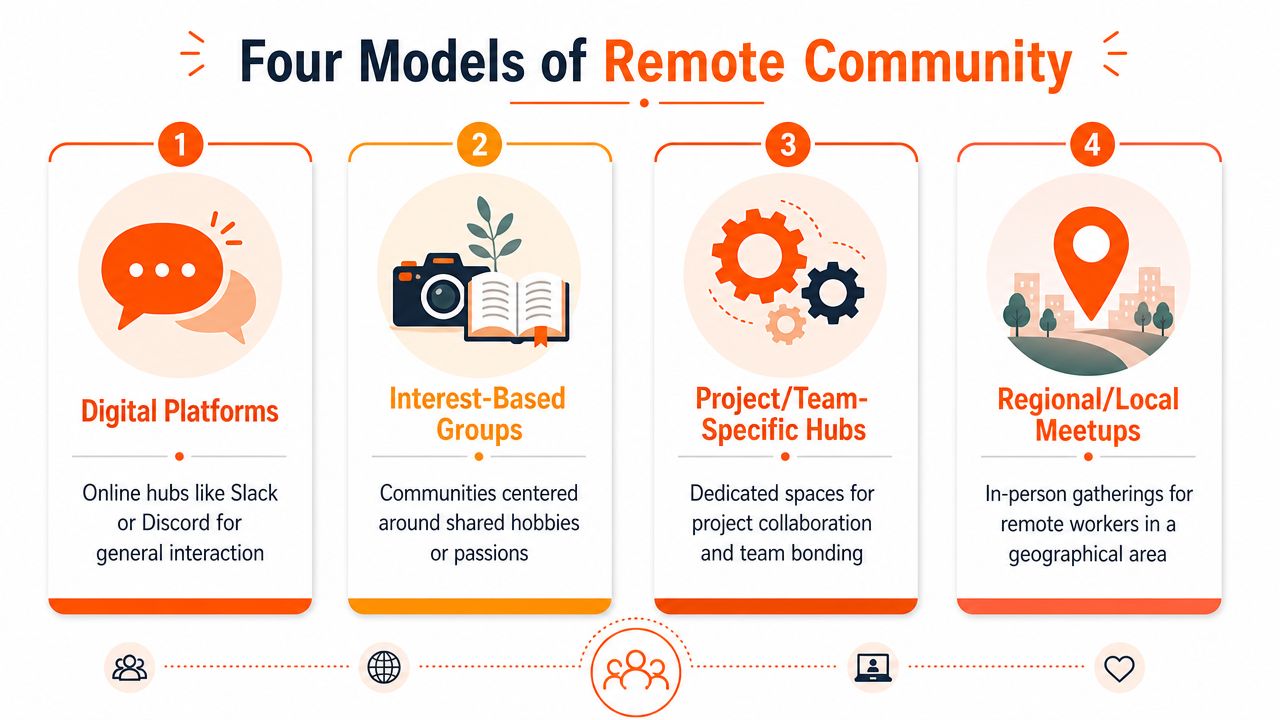
Digital platforms
Slack and Discord communities are the town squares of remote work. They're fast, visible, and easy to join.
They're best when you want rapid feedback, casual conversation, or access to a broad network. They're worst when nobody curates the experience and every channel becomes a stream of self-promotion, announcements, and half-finished conversations.
Use them for:
- Quick problem solving: Good for software questions, tool recommendations, and “has anyone dealt with this before?”
- Ambient belonging: Useful if seeing other remote professionals talk through daily work helps you feel less isolated.
- Opportunity flow: Job leads, collaborations, referrals, and intros often surface here first.
The trade-off is noise. If the group doesn't have strong moderation, it becomes yet another Slack group you mute.
Coworking hubs and physical spaces
These communities solve a different problem. They create presence. Even if you only go once or twice a week, the simple fact of seeing familiar faces changes the texture of remote work.
They're especially good for people who focus better around others, new residents trying to rebuild a social base, and freelancers who miss casual professional contact. They're less useful if the space is basically a room full of silent laptop users with no programming or member culture.
A coworking space without community design is just rented Wi-Fi with coffee.
The best ones don't force interaction. They create light structure. Lunch tables. Demo days. member-led meetups. Intro sessions for new joiners.
Hyper-local meetups
Local remote worker meetups tend to create the deepest trust fastest. You're not talking with a generic internet audience. You're talking with people who share your city, commute patterns, childcare realities, weather, and local economy.
That matters because remote work isn't evenly distributed. In the U.S., remote-work share rose from 5.6% in 2019 to 17.9% in 2021, but it's highly concentrated. The top commuting zones average 28.0%, while the bottom quarter are below 7.2%, according to the Economic Innovation Group's analysis of the uneven geography of remote work.
That unevenness shapes your options. In some places, local community is easy to find. In others, digital community has to carry more of the load.
If you're trying to build local ties, this guide on how to grow your professional network is useful because it focuses on finding real fit, not collecting contacts.
Asynchronous networks
Forums, niche communities, private circles, and curated email-based groups are slower by design. That's their advantage.
These spaces work well for people who hate chat fatigue, live across time zones, or prefer thoughtful participation over constant presence. A strong async group can outperform a busy live channel because the best ideas don't vanish in an hour.
Here's a quick way to compare them:
| Model | Best use case | Main risk |
|---|---|---|
| Digital platforms | Speed and breadth | Noise |
| Coworking hubs | Presence and routine | Shallow interaction |
| Hyper-local meetups | Trust and local ties | Geography limits |
| Async networks | Depth and flexibility | Lower energy |
A lot of people need two communities, not one. One broad and digital. One smaller and more personal.
How Job Seekers Can Turn Community Into Opportunity
Job seekers often join communities too late and ask for too much too fast. They enter when they need a job immediately, post “any leads?” and disappear if nobody answers.
That rarely works. Community creates opportunity when you build reputation before you ask for help.
Listen before you perform
The first move is observation. Join a few communities where hiring managers, recruiters, team leads, or respected practitioners spend time. Then watch.
Look for signals:
- Who answers questions generously
- Who posts open roles or mentions hiring plans
- Which conversations get real engagement
- Whether people in the group discuss work seriously or just trade links
If you're still sorting through where to search in parallel, this roundup of the best remote job boards helps you combine community-based networking with direct applications.
Contribute in ways that are easy to trust
Contribution is often thought to mean posting thought leadership. It usually doesn't. In a remote work community, the most credible contributions are smaller and more concrete.
- Answer practical questions: If someone asks about onboarding, analytics tools, design handoff, or customer success workflows, give a clear answer.
- Share a useful resource: Not ten links. One good one, with a sentence on why it matters.
- Add context from experience: “We tried this and ran into these trade-offs” is more helpful than broad advice.
- Follow up: If someone helped you, report back with what worked.
This is how social capital forms. People start to associate your name with usefulness.
Don't try to look impressive. Try to be reliably helpful.
Use the Listen Contribute Connect rhythm
A simple framework works well here.
Listen
Learn the norms. Figure out which members have influence. Notice which topics matter.Contribute
Help in public where others can see the quality of your thinking and communication.Connect
Move to direct messages only after there's context. Ask specific questions. Thank people for something precise. Request insight, not favors.
A good message might ask how a team structures async collaboration, what skills matter most in a role, or whether a portfolio piece is landing the right way. A weak message asks a stranger to “refer me.”
What communities can unlock
Communities can help job seekers in three ways that job boards alone often can't:
- Earlier visibility: You hear about team growth before a public posting goes live.
- Reputation transfer: Someone who has seen your contributions is more likely to vouch for you.
- Peer feedback: Other members can tell you whether your resume, portfolio, or positioning is making sense.
The long game matters more than the hack. The best remote opportunities often come through repeated presence, not a single perfect post.
Building a Distributed Culture A Guide for Employers
A new hire joins on Monday. By Friday, they know where the project tracker lives, which Slack channels matter, and how to submit work. They still do not know who to ask a dumb question, where informal context gets shared, or whether anyone would notice if they went quiet.
That gap is the culture problem.
Employers often treat distributed culture like a tooling decision. Add Slack, schedule a virtual social, spin up a few channels, and hope connection follows. It rarely does. A healthy remote work community comes from repeatable habits, clear norms, and spaces that give people a reason to show up.
This is now part of the job design
Remote and hybrid work are not side cases anymore. Among remote-capable employees, about 60% want a hybrid arrangement, roughly one-third prefer fully remote work, and fewer than 10% prefer on-site only, according to Gallup's hybrid work indicator. Gallup also cites broader research showing that 83% of global employees say hybrid is the ideal setup.
Employers have to build for the way people work. That includes connection. If distributed staff only meet in status updates and crowded channels, collaboration gets transactional fast.
What weak remote culture usually looks like
The failure mode is familiar. Companies create more places to talk instead of better reasons to connect.
A few patterns show up again and again:
- Mandatory social time: People attend because they have to, not because the format helps them build trust.
- Too many channels: Conversation fragments, nobody knows where to post, and quieter employees disappear.
- Single-event thinking: A happy hour happens once, then nothing carries into the next week.
- Values without mechanisms: Leaders talk about belonging, but no routine makes belonging easier.
This is why so many teams end up with yet another Slack group that feels busy and empty at the same time.
What holds up in practice
Strong distributed culture is usually smaller and more deliberate than leaders expect. The goal is not constant interaction. The goal is reliable connection that supports work.
Build around small groups
Belonging rarely starts in a company-wide channel. It starts in groups small enough for people to speak without performing. Good formats include onboarding cohorts, manager peer groups, cross-functional circles, buddy systems, and short-term working groups tied to real problems.
I have seen this work best when each group has a simple purpose and a light cadence. Monthly is often enough. Weekly only works if the conversation is useful.
Keep non-work spaces few and specific
A lot of internal communities fail from overbuilding. One active channel with a clear social purpose beats ten empty ones. A parenting space, a local city channel, a reading thread, or a place to share works-in-progress can be enough.
Restraint matters. Every new channel asks people to monitor one more stream.
Support employee-led local connection
Distributed does not mean fully digital. If people live near one another, give them budget and permission to meet without turning every meetup into a branded event. Coffee, coworking, or a simple lunch can do more for trust than another company-wide session on camera.
The best local gatherings are lightly supported and loosely structured. Employers set guardrails, cover costs, and stay out of the way.
Make async rituals part of the culture
Remote teams need ways to connect that do not depend on time zones or personality type. Written introductions, weekly reflection threads, demo recaps, gratitude posts, and internal learning libraries work because people can join on their own schedule.
This also improves inclusion. The loudest voices stop dominating every social moment, and people who think better in writing get a fairer shot at being known.
Community design affects hiring and retention
Candidates can tell when a company has confused tools with culture. They ask sharper questions. How does onboarding work? Who helps new hires build context? Where do relationships form outside the manager chain? If the answer is basically “we have Slack,” they hear the risk.
Teams that want strong distributed talent need systems that support remote work from the first interview through ramp-up. This guide to hiring remote employees is a useful companion if you are building that operating model end to end.
Teams need fewer channels and better touchpoints.
Why this affects performance
Culture work is operational work. The U.S. Bureau of Labor Statistics found that from 2019 to 2021, a 14.9 percentage-point increase in workers primarily working from home across industries was associated with an average 1.2 percentage-point increase in industry-level total factor productivity. That finding matters, but it does not mean a chat platform improves output on its own.
Performance improves when people know how to coordinate, where to ask for help, and which routines reduce friction. Community supports those outcomes. It shortens ramp time, makes knowledge easier to share, and reduces the isolation that causes small blockers to turn into long delays.
If you want someone to own this work clearly, scaling the community manager role in 2026 is worth reading because it treats community as an operating function with scope, systems, and accountability.
Your Playbook for Joining or Building a Community
You join a remote community because you want real help, real peers, or a real sense of belonging. Two weeks later, you are staring at yet another Slack group with 19 muted channels, a flood of self-promotion, and no one you would message when work gets hard.
That outcome is common because people confuse access with connection. A useful remote work community gives members a reason to return and a clear way to participate without burning out.
The practical question is simple. Are you trying to join a community that already works, or create one that people will keep choosing?
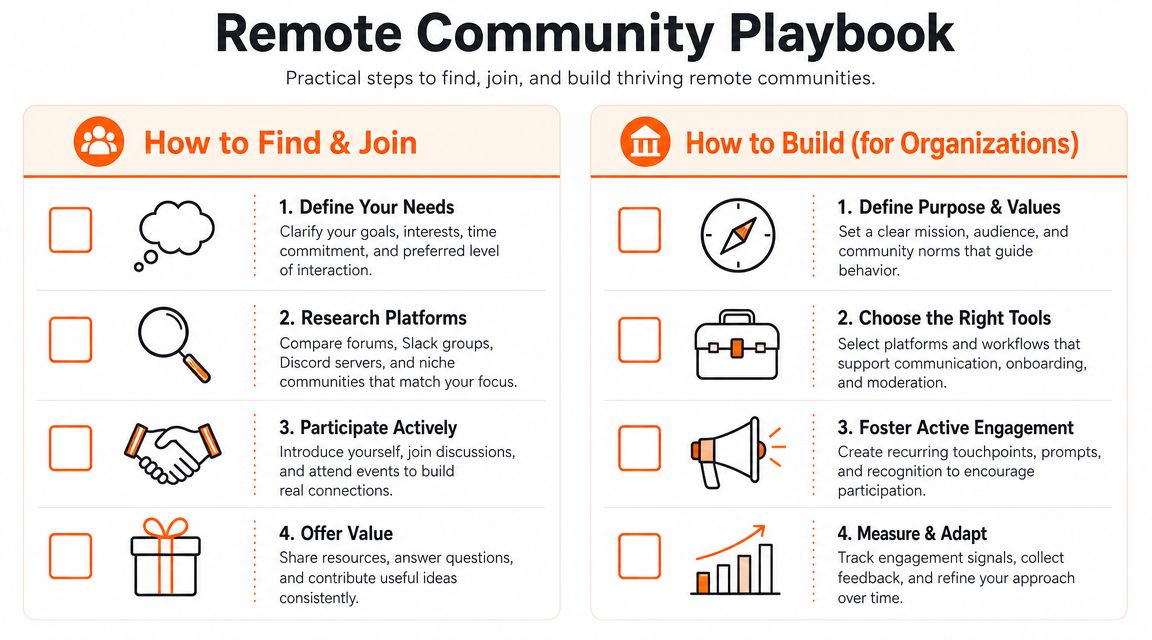
How to find and join the right community
Start with the outcome you want. Platform choice matters later.
A lot of disappointment starts when someone joins the busiest group they can find instead of the one that fits their stage, schedule, and goals. A founder looking for peer candor needs a different room than a job seeker trying to build visibility. A parent working remotely may need a community that accepts uneven availability, not one built around constant live participation.
Use a short filter before you commit:
- Do you want peers, referrals, or friendship
- Do you want a local network or a distributed one
- Can you participate asynchronously, or do you want live events
- Do you want a broad professional mix or a narrow specialty
- Do you have enough energy for another channel, or do you need one high-signal space
Then spend a week observing before you introduce yourself.
Signs a community is healthy
- New members are welcomed and shown where to start
- Questions get specific replies, not emoji-only reactions
- Members talk to each other, not just at the organizer
- The purpose is clear
- There is a visible rhythm, such as office hours, resource threads, or recurring discussions
- You can tell who this space is for, and who it is not for
Signs to leave quickly
- Everything is a pitch
- The loudest people set the tone
- No one follows up after the first interaction
- Activity is high, but trust is low
- You feel pressure to perform instead of participate
Once you join, skip the dramatic entrance. A short intro is enough. Say what you do, what you are trying to learn, and one way you can help.
Then become familiar through steady participation. Reply to one useful thread each week. Show up to one recurring event each month. Thank people when their advice changes your approach. That pattern builds trust faster than a long introductory post.
A lot of Slack-based groups fail because they add channels faster than they create useful habits. If you are evaluating or launching one, AsanteBot's Slack community tips are practical on channel structure, moderation, and keeping discussions usable.
Here's a helpful discussion to keep in mind as you evaluate examples in the wild:
How to build a community from scratch
Good communities rarely start big. They start specific.
“Remote workers” is too broad to create loyalty. People return when the group helps them solve a problem, meet peers who understand their context, or feel less alone in a work style that can get isolating fast.
A sharper starting point sounds like this:
- Remote product managers in Europe
- Parents working remotely in one city
- First-time remote engineering managers
- Independent marketers building async businesses
That kind of focus improves everything. The welcome message is clearer. Members know why they belong. Conversations get useful faster.
Design the first month, not just the launch
Founders often open the space, invite people in, and hope momentum appears. It usually does not.
Set up the first month with intention:
- A welcome post that explains who the group is for
- A short code of conduct
- Three to five starter threads with specific prompts
- One recurring ritual, such as Friday wins or monthly peer problem-solving
- Direct outreach to early members who are likely to contribute
Early structure matters because members are deciding whether this will become part of their routine or another ignored tab.
Make the first contribution small
Remote workers are already managing message fatigue, meeting fatigue, and tool fatigue. The easier the first contribution, the better your odds of getting a second one.
Use low-friction formats:
- Prompt-based introductions
- Request-for-feedback threads
- Office hours
- Resource swaps
- Small local meetups or virtual coffees
- Short “who can help with this?” posts
Build for the member who is interested but tired.
Give regulars a job
Communities get stronger when participation stops running through one founder. Invite active members to welcome newcomers, host a discussion, collect resources, or organize a meetup. Shared ownership spreads the work and deepens commitment.
If you are still deciding which platform setup supports that kind of participation, this guide to the best tools for remote work in 2026 is a useful reference point.
Track proof of connection
Member count is a weak metric on its own. Look for signals that people are building actual working relationships.
Useful signs include:
- Members come back after week one
- People answer each other without a moderator stepping in
- Conversations continue in direct messages, small groups, or meetups
- Members mention that the community helped them solve a problem, make a hire, or find an opportunity
That is the point of the work. Fewer channels. Better interactions. A community people would miss if it disappeared.
Essential Tools and Best Practices for a Thriving Community
A remote community starts to fail the moment every need gets its own channel, app, or recurring call. I have seen smart groups bury good conversations under too many pings. The better approach is usually smaller: one place for discussion, one place for resources, one clear rhythm for live interaction.
Tools matter, but tool count matters too.
The goal is not to build the busiest space. It is to create a place where people can ask a real question, get a useful answer, and come back because the exchange was worth their time.
Practices that keep communities useful
- Set norms early: Spell out what belongs where, how people ask for help, and what kind of promotion is allowed. Clear rules reduce noise and make participation feel safer.
- Design for response quality: A community gets stronger when replies are specific, generous, and grounded in experience. Reward useful answers, not just fast ones.
- Keep live programming limited: Events should create momentum, not another calendar burden. A few well-run office hours or roundtables will usually outperform a packed events schedule.
- Choose asynchronous by default: Discussion threads, searchable resources, and written recaps respect time zones and reduce meeting fatigue.
- Review channel sprawl often: If a channel is inactive, repetitive, or confusing, merge it, archive it, or remove it. More rooms rarely create more belonging.
- Measure relationship signals: Look for repeat participation, member-to-member help, follow-up conversations, and practical outcomes like referrals, collaborations, or solved problems.
There is also a business reason to care about this. As noted earlier, remote work performs better when coordination is clear and people can get help without friction. Community structure supports that. A messy setup drains attention. A well-run one helps people solve problems faster and trust each other more.
Recommended Remote Community Platforms
| Tool | Primary Use Case | Best For |
|---|---|---|
| Slack | Real-time discussion | Professional groups, team communities, fast feedback |
| Discord | Multi-channel chat with flexible community structure | Creator communities, technical groups, informal networks |
| Circle | Branded community hub with organized discussions | Membership communities, courses, curated professional groups |
| Discourse | Asynchronous forum discussions | Knowledge sharing, thoughtful Q&A, long-term archives |
| Zoom | Live events and meetings | Workshops, office hours, cohort sessions |
| Google Meet | Lightweight video meetups | Small gatherings, team drop-ins, simple live sessions |
| Notion | Shared resources and documentation | Community handbooks, directories, onboarding guides |
| Meetup | Local event coordination | Regional remote worker meetups and in-person gatherings |
| LinkedIn Groups | Professional discovery | Industry-based networking and light-touch engagement |
Each tool changes behavior, so choose based on the kind of connection you want to create. Slack and Discord are fast, but they can exhaust people and bury valuable discussion. Discourse and Circle slow things down in a good way, which often leads to better questions, better answers, and a stronger archive over time. Notion is useful as a support tool, not a community home. Zoom and Google Meet work best when they serve conversation that already has a reason to exist.
If you are comparing platforms alongside your broader collaboration stack, this guide to the best tools for remote work in 2026 is a useful reference.
A strong community leaves people clearer, calmer, and better connected than they were before.
If you're looking for remote roles or building a distributed team, YayRemote is a practical place to start. Job seekers can explore curated remote opportunities and career tools, while employers can reach global talent without the usual friction.