Master Your Terraform Lambda Layer Setup in 2026
Learn to manage shared dependencies with a Terraform Lambda Layer. Our 2026 guide covers packaging, versioning, and CI/CD best practices for Node and Python.
You're probably dealing with one of two Lambda setups right now.
Either every function carries its own copy of the same dependencies, so each deploy feels heavier than it should. Or you already use layers, but they've turned into another moving part that breaks at the worst moment. A function updates before the layer does. A Python dependency works in one runtime and fails in another. A team member publishes a new layer version, and half the fleet starts behaving differently.
That's where a production-ready terraform lambda layer setup matters. The hard part isn't creating a layer. It's making packaging repeatable, versioning boring, and deployment safe enough that multiple engineers can touch it without surprises.
Why You Need to Tame Your Lambda Dependencies
A team usually notices the dependency problem after a routine deploy. One Lambda ships with a newer SDK than the rest. Another includes a patched library that never made it into the worker functions. A third passes tests, then fails in production because the build machine packaged native dependencies differently. At that point, layers stop being an optimization and start becoming part of release engineering.
Bundling dependencies into every Lambda function is manageable for a small service. It gets expensive once the same packages show up across API handlers, queue consumers, cron jobs, and event processors. Build times grow, artifacts get larger, and teams lose confidence that functions sharing the same library are running the same code.
Lambda layers help by turning shared dependencies into a versioned artifact instead of a copied folder. That shift is useful on its own, but the true value shows up when a team has to support more than one runtime, publish controlled updates, and promote artifacts through CI instead of by hand. The same discipline behind implementing containers in CI/CD pipelines applies here. Build once, tag clearly, promote deliberately.
The real problems layers should solve
The first problem is package bloat. Python functions with compiled libraries and Node.js functions with large dependency trees become awkward to build, slow to upload, and harder to inspect when something breaks.
The second is consistency. If several functions depend on the same logging package, auth helper, or internal SDK wrapper, separate copies drift fast. One function gets a security fix. Another keeps the old behavior for weeks because nobody noticed the difference in its lockfile or build output.
The third is change control. Many teams start with a manual layer workflow. Someone zips a folder, publishes a layer, copies an ARN into Terraform or the console, and hopes every environment points to the right version. That approach fails once multiple engineers, accounts, and runtimes are involved.
Practical rule: If more than a couple of functions share dependencies, treat the layer like a product with owners, versions, and release notes.
Why Terraform is part of the solution
Terraform gives the layer a lifecycle that can be reviewed and repeated. The artifact hash drives updates. Functions reference explicit layer versions. Teams can see what changed, who changed it, and which environments received the new version.
The reason is simple: Lambda layers are useful only when they stay boring.
A production-ready terraform lambda layer setup usually aims for four outcomes:
- Clear ownership so shared libraries are maintained in one place
- Predictable versioning so Python and Node.js layers can evolve without surprising downstream functions
- Controlled rollouts so teams can pin, test, and promote layer versions across accounts and environments
- Repeatable builds so CI produces the same artifact every time, instead of depending on a developer laptop
Terraform does not fix poor packaging or weak version discipline. It does make good decisions repeatable, which is what teams need when layers move from a convenience to shared infrastructure.
Structuring and Packaging Layer Artifacts
Most Lambda layer failures start before Terraform ever runs. The ZIP is valid, the resource applies, the ARN gets attached, and then the function errors at runtime because the dependency is in the wrong folder.
Lambda is strict about directory layout. If the archive structure doesn't match what the runtime expects, imports fail even though deployment looked successful.
Use the runtime's expected folder layout
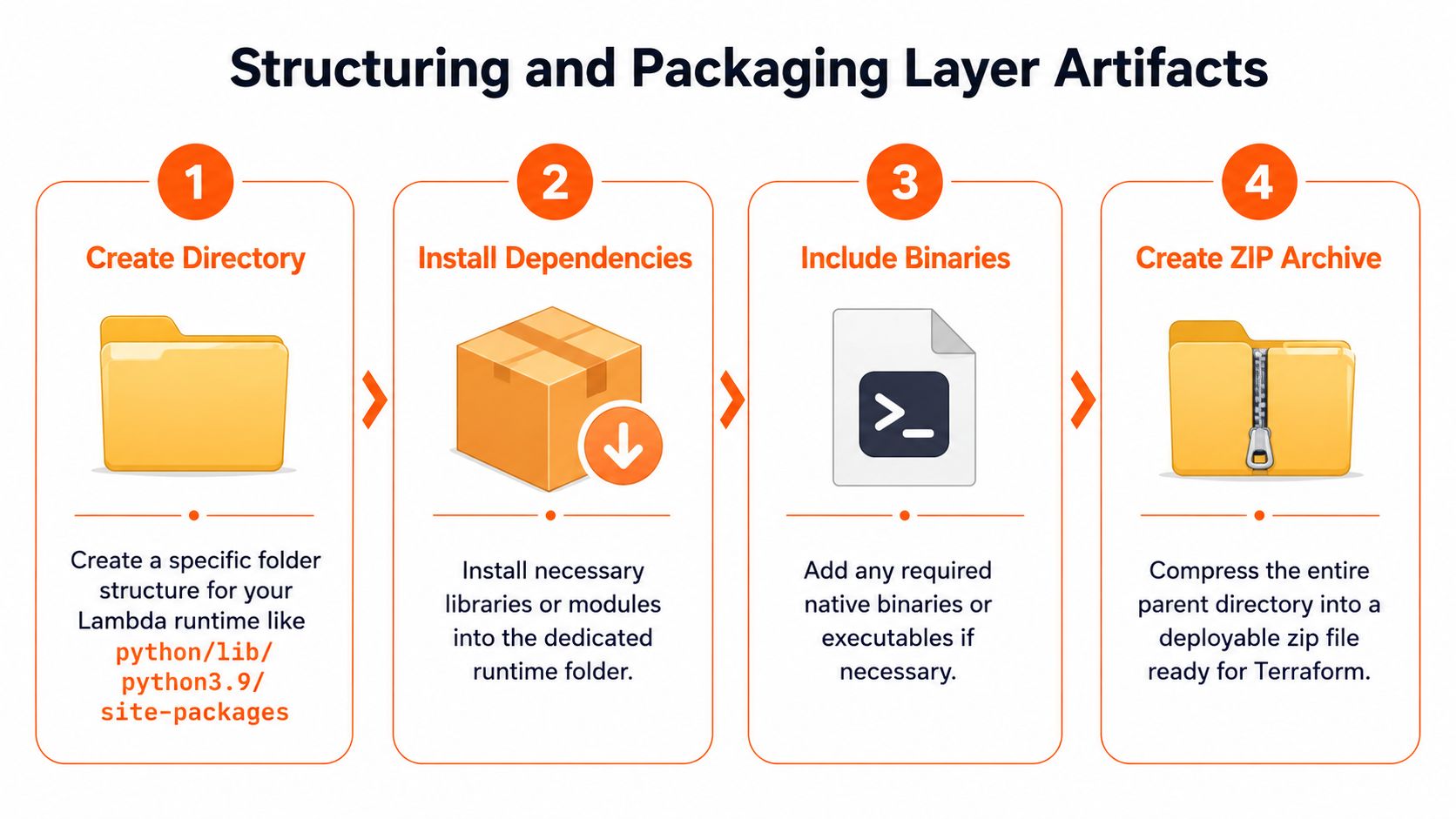
For Python, the safe default is to build the package so your dependencies sit under a python/ path that Lambda can load. For Node.js, dependencies need to be under nodejs/node_modules. If you mix those up, Terraform won't complain. Lambda will.
Here's the packaging difference in a format teams can use during reviews.
| Aspect | Python | Node.js |
|---|---|---|
| Top-level folder in ZIP | python/ |
nodejs/ |
| Typical dependency path | python/lib/python3.x/site-packages or python/ for many packages |
nodejs/node_modules |
| Common install method | pip install -r requirements.txt -t package/python |
npm install --production inside package/nodejs |
| Import expectation at runtime | Python modules available from /opt/python paths |
Node modules resolved from /opt/nodejs/node_modules |
| Most common packaging mistake | Zipping the wrong parent folder | Putting package.json at the wrong level without installed modules |
Build the artifact outside Terraform first
A lot of teams try to make Terraform do everything. That usually creates a fragile local workflow. The better pattern is to treat artifact creation as a build step and let Terraform publish the result.
For Python layers, the practical sequence is:
- Create a clean build directory.
- Add a
python/folder inside it. - Install dependencies into that folder.
- Zip the build directory, not just the dependency subfolder.
For Node.js layers, the flow is similar, but the shape changes:
- Create a clean build folder with
nodejs/ - Copy
package.jsonif your build depends on it - Run production dependency install inside
nodejs/ - Zip the build directory from the correct parent
A layer that works locally because your editor path is forgiving can still fail in Lambda. Always inspect the ZIP contents before publishing.
Handle multiple runtimes with one framework
If your team supports both Python and Node.js functions, don't force one packaging convention on both. Use one repository pattern, but separate build logic by runtime. The framework should be unified. The artifacts should not.
A clean repo layout often looks like this in practice:
layers/python-common/for Python requirements and build scriptlayers/node-common/for Node dependencies and build scriptscripts/for repeatable packaging commandsdist/or another ignored output directory for generated ZIPs
That approach gives you one Terraform module interface while preserving runtime-specific packaging.
If your CI system already uses containers for reproducible builds, it's worth reviewing patterns for implementing containers in CI/CD pipelines. Lambda layer packaging benefits from the same idea. Build in a consistent environment so dependency resolution doesn't drift between developer laptops and your pipeline runner.
Avoid the runtime surprises that waste hours
The errors that eat the most time are usually mundane:
- Wrong ZIP root. You zipped
package/pythoninstead ofpackage, so Lambda can't find the expected top-level directory. - Native dependency mismatch. A package installs locally but not for the Lambda execution environment.
- Dirty build directories. Old files stay in the artifact and keep shipping after you thought they were removed.
- Mixed concerns. One layer contains unrelated utilities, binaries, and shared libraries, which makes ownership unclear.
The fix is boring and that's good. Build cleanly, inspect the ZIP, keep each layer focused, and make packaging deterministic.
Defining Your First Terraform Lambda Layer Resource
A clean ZIP is only half the job. The Terraform resource is where teams either get a predictable release process or create a shared dependency nobody wants to touch six months later.
For Lambda layers, the resource to care about is aws_lambda_layer_version. It publishes an immutable version from a ZIP file. The field that keeps this reliable is source_code_hash. If that hash does not change when the artifact changes, Terraform can miss a publish and your functions keep pointing at the wrong dependency package.

A production-ready base resource
A practical starting point looks like this:
data "archive_file" "python_common_layer" {
  type        = "zip"
  source_dir  = "${path.module}/build/python-common"
  output_path = "${path.module}/dist/python-common-layer.zip"
}

resource "aws_lambda_layer_version" "python_common" {
  layer_name          = "python-common"
  description         = "Shared Python dependencies for API and worker functions"
  filename            = data.archive_file.python_common_layer.output_path
  source_code_hash    = data.archive_file.python_common_layer.output_base64sha256
  compatible_runtimes = ["python3.11", "python3.12"]
}

resource "aws_lambda_function" "api" {
  function_name    = "app-api"
  role             = aws_iam_role.lambda_exec.arn
  handler          = "handler.main"
  runtime          = "python3.12"
  filename         = "${path.module}/dist/api.zip"
  source_code_hash = filebase64sha256("${path.module}/dist/api.zip")

  layers = [
    aws_lambda_layer_version.python_common.arn
  ]
}
This works well for a first implementation, but production use usually needs one change in approach. Build artifacts in CI, then pass Terraform a known ZIP path. Teams get fewer surprises when Terraform publishes prebuilt artifacts instead of also acting as the packaging tool.
What each attribute does in practice
layer_name should stay stable across releases. AWS versions the layer separately, so adding version numbers to the name usually creates clutter and makes references harder to read.
filename points to the ZIP Terraform will publish. In a team environment, that file should come from a repeatable build job, not from a developer machine. That matters even more when one framework supports multiple runtimes and packaging steps differ between Python and Node.js.
compatible_runtimes is a safety check, not decoration. Set it to the runtimes you specifically tested. If a layer contains compiled dependencies or runtime-specific libraries, this is one of the few guardrails that stops accidental misuse.
source_code_hash tells Terraform when the artifact changed. Without it, layer updates become guesswork. With it, a changed ZIP publishes a new layer version, which is exactly what you want in a CI/CD flow.
Keep Terraform focused on publishing, not building
Using archive_file is fine for a simple example, but it has limits. It works best when Terraform zips a prepared directory. It is a poor place to install dependencies, compile native extensions, or decide which runtime-specific files belong in the package.
For teams supporting Python and Node.js under one internal layer framework, a better pattern is to keep the module interface small and push build complexity into the pipeline:
layer_nameartifact_pathcompatible_runtimesdescription
That gives you one reusable Terraform module and separate packaging jobs per runtime. The result is easier to test, easier to review, and much easier to plug into promotion pipelines.
For engineers building this kind of platform workflow, this Terraform-focused Azure infrastructure engineering role reflects the same skill set: reusable modules, controlled releases, and infrastructure code that survives team growth.
Attaching layers without creating hard-to-track dependencies
Referencing the layer from a function is simple:
layers = [
  aws_lambda_layer_version.python_common.arn
]
The harder part is deciding what belongs in a layer at all.
Use layers for shared code that changes slowly and has clear ownership. Internal SDKs, logging libraries, certificates, and common utilities usually fit. Function-specific business logic usually does not. If one function needs weekly changes and ten others depend on the same layer, every publish becomes a coordination problem.
Keep the layer list short. Keep names explicit. Keep ownership clear.
AWS also enforces packaging limits for layer size and the number of layers a function can attach, so packaging decisions have to stay disciplined. Those limits matter more in real systems than the HCL syntax itself.
What holds up in production
The maintainable pattern is boring on purpose:
- Build the artifact outside Terraform
- Publish it with
aws_lambda_layer_version - Set
source_code_hash - Declare only the runtimes you support
- Attach the layer only where the dependency is specifically shared
That approach scales better than clever module tricks. It also gives teams a clean path to version promotion later, which is where Lambda layer management starts to matter.
Managing Versions and Cross-Account Permissions
Layer management gets real when multiple engineers start publishing updates. The key behavior to understand is that each aws_lambda_layer_version creates an immutable artifact. You aren't editing a layer in place. You're publishing a new version and deciding which functions should move to it.
That immutability is a strength when teams use it intentionally. According to HashiCorp material cited in the Terraform resource documentation, this versioning approach prevents 95% of dependency conflicts in large-scale deployments, and sharing one layer across 10+ functions can cut duplication by 70 to 85% (Terraform aws_lambda_layer_version resource documentation).
Treat versions as releases, not replacements
A common mistake is to publish a new layer and assume all consumers should immediately track it. That turns a shared dependency into an outage multiplier.
A better model is simple:
- Publish a new version when the artifact changes
- Let existing functions keep their current ARN until you update them
- Promote the new version through environments intentionally
- Roll back by repointing functions to the prior versioned ARN if needed
Terraform helps in such situations. If the layer ZIP changes and the hash changes with it, Terraform publishes a new version. Functions referencing the old ARN stay on the old version until their own configuration changes.
Don't think of a layer update as “updating the layer.” Think of it as “publishing another immutable release.”
Semantic rules for teams
AWS gives version numbers automatically, but teams still need human rules. Increment-only publishing isn't enough for safe collaboration.
Good team habits include:
- Separate breaking from non-breaking changes in commit messages and release notes
- Pin exact layer ARNs in function definitions for controlled rollout
- Keep old versions available while functions migrate
- Assign ownership so someone is accountable for compatibility
This is the part many hello-world guides skip. The Terraform resource is easy. The release discipline is the actual system.
Sharing layers across accounts
Cross-account sharing is useful when a central platform team publishes a standard layer for multiple AWS accounts. The pattern is straightforward. Publish the layer in one account, then grant lambda:GetLayerVersion permission with aws_lambda_layer_version_permission.
A typical Terraform shape looks like this:
resource "aws_lambda_layer_version_permission" "shared" {
  layer_name     = aws_lambda_layer_version.python_common.layer_name
  version_number = aws_lambda_layer_version.python_common.version
  principal      = "123456789012"
  action         = "lambda:GetLayerVersion"
  statement_id   = "allow-shared-account"
}
The operational rule matters more than the syntax. Share specific versions, not a fuzzy idea of “latest.” Consumers in other accounts need predictable references and a clear promotion path.
What usually breaks in enterprise setups
Cross-account layer reuse fails when teams blur boundaries. One account publishes too frequently, another consumes without pinning, and nobody tracks which functions depend on which version.
Avoid that by keeping a simple release contract:
| Concern | Safe practice |
|---|---|
| Publishing | Release a new immutable version only after artifact validation |
| Consumption | Reference explicit versioned ARNs |
| Rollback | Repoint functions to the prior ARN |
| Ownership | Keep one team responsible for compatibility and deprecation |
That's enough to keep shared layers useful instead of political.
Integrating Layer Deployment into a CI/CD Pipeline
The difference between a workable layer setup and a reliable one is automation. Manual layer publishing might survive one engineer and one environment. It won't survive a busy team shipping often.
A clean pipeline starts with a dependency change. Someone updates requirements.txt or package.json, pushes a branch, and CI takes over.

What the pipeline should do
The flow doesn't need to be complicated. It needs to be consistent.
A solid sequence looks like this:
- Build the layer artifact in a controlled environment.
- Package the ZIP with the correct runtime folder structure.
- Store the artifact where Terraform can consume it reliably.
- Run
terraform plan. - Publish the new layer version.
- Update functions that should adopt that version.
That separation matters. Build systems create artifacts. Terraform manages infrastructure state. Mixing the two too tightly makes debugging painful.
For teams improving broader release discipline, this guide on automating backend deployment workflows is useful context because the same principle applies here: remove handoffs that depend on memory.
The part that fails in real pipelines
Layer deployment has a few failure modes that don't show up in small demos. One of the biggest is ordering. In naive CI/CD setups, a function can deploy before the new layer version is available, causing up to 25% of deployment failures. The same analysis also notes that layer updates require dual API calls, which can double deployment time compared with bundled functions (Aaron Stuyvenberg on why you should not use Lambda layers).
That doesn't mean layers are a bad idea. It means your pipeline needs explicit sequencing.
CI should publish the layer artifact first, confirm the new version exists, and only then let dependent functions update.
A practical GitHub Actions or similar workflow usually separates jobs like this:
- Build job that installs dependencies and creates the ZIP
- Artifact job that stores the packaged output
- Terraform job that publishes the new layer version
- Function rollout job that updates selected consumers
That structure also helps when you need approvals between staging and production.
Use environment promotion, not environment drift
A lot of teams accidentally rebuild the same layer separately for dev, staging, and prod. That creates three similar but not identical artifacts.
The better pattern is to build once and promote the artifact. Terraform can still manage environment-specific resources, but the dependency package should remain stable across the promotion path whenever possible.
That's especially important for distributed teams. Clear, boring release mechanics reduce confusion when people work across time zones and hand off work asynchronously. If you're building that kind of engineering culture, these software development best practices for distributed teams line up well with how layer promotion should work.
Later in the pipeline, visual walkthroughs can help newer team members understand what's happening at each stage.
A simple release policy that works
You don't need a complex platform to productionize layers. You need a release policy people will follow:
- Build once so the layer artifact is consistent
- Publish explicitly so Terraform creates a new immutable version
- Promote deliberately so environments adopt known versions
- Roll back fast by switching function references to an earlier ARN
That policy does more for reliability than adding another shell script ever will.
Advanced Patterns and Security Best Practices
The mature question isn't “can we use layers?” It's “should this dependency live in a layer at all?”
That distinction matters because layers come with trade-offs. They can simplify shared dependency management, but they also add version coordination, packaging rules, and operational coupling. Use them where that trade is worth it. Skip them when bundling is simpler and safer.

Put security checks in the artifact path
If a layer contains shared dependencies, it's part of your platform surface. Scan it before publish, not after rollout. Teams commonly wire dependency and filesystem scanning into CI so the build fails before Terraform ever sees the artifact.
That's especially important for layers because one bad package version can spread across many functions at once. Shared code should face stricter review than single-function code, not looser review.
Monitor the failure that actually matters
Layer issues usually show up as runtime errors, not as Terraform problems. The best operational signal is often the Lambda error rate.
You can create a CloudWatch alarm on error rate using metric math with IF(m1 > 0, m2 / m1, 0), where m1 is Invocations and m2 is Errors. The same guidance notes that forgetting metric IDs or return_data=true causes 80% of initial alarm setup failures, and those failures get worse when a mismatched layer version triggers error spikes (CloudWatch metric math alarming for Lambda error rates).
A practical Terraform shape looks like this conceptually:
- define invocation metric
- define error metric
- define error-rate expression
- alarm on the expression, not the raw error count
Operator note: Alarm on the ratio. Raw error counts can mislead when traffic changes.
Know when not to use a terraform lambda layer
There are cases where layers aren't the right answer:
- Fast-changing app code that only one function uses
- Dependencies tightly coupled to one runtime build
- Artifacts that are awkward to package cleanly
- Situations where container images are simpler operationally
Here, engineering judgment outweighs ideology. A terraform lambda layer is a strong tool for shared readonly libraries and stable platform dependencies. It's a poor fit for every package by default.
Security and reliability in remote teams also depend on process outside AWS. Clear access control, least privilege, and disciplined change review still matter. These remote work security best practices are relevant because infrastructure problems rarely start with Terraform alone.
The teams that get layers right don't just publish them. They package them cleanly, version them deliberately, scan them before release, and watch the functions that consume them.
If you're building the kind of infrastructure career that values clean automation, strong Terraform habits, and remote-friendly engineering practices, YayRemote is worth a look. It curates remote roles across engineering, platform, cloud, and DevOps, along with practical resources that help distributed professionals work better across teams and time zones.