How to Beat ATS and Land Your Next Remote Job
Learn how to beat ATS with proven resume strategies for 2026. This guide covers formatting, keywords, and real-world tips to get noticed by recruiters.
Getting your resume past an Applicant Tracking System (ATS) really comes down to two things: clean, simple formatting and a smart keyword strategy. These systems are the first hurdle in the hiring process, and if you don't play by their rules, a human recruiter will never even see your application.
Why Your Resume Is Vanishing into the Digital Abyss

Ever feel like your resume just disappears into a black hole? You find a great remote role, polish your resume until it shines, click "submit," and get nothing but silence in return. The culprit is almost always an Applicant Tracking System, the software that the vast majority of companies now use to manage the flood of applications.
Here’s the thing you have to understand: an ATS isn’t designed to find the best candidate. Its primary job is to quickly weed out applicants who don't seem to match a specific set of criteria. Think of it as a bouncer with a very strict, very literal checklist. If your resume isn't formatted in a way it can understand, you're not getting in.
The Problem with Parsing Errors
The whole issue starts with how an ATS "parses," or reads, your resume. The software scans the document to pull out key information—your work history, skills, contact info—and slots it into a digital profile for the recruiter. This process is anything but flawless.
This is exactly where perfectly qualified people get tripped up. A resume that looks great to the human eye can be a jumbled, unreadable mess for a machine. Seemingly innocent design choices can cause the system to fail spectacularly.
- Complex Formatting: Columns, tables, and text boxes are classic ATS-killers. The software might read the columns out of order or just skip them.
- Uncommon Fonts: Stick to the basics. If an ATS doesn't recognize a custom or script font, it might turn your entire resume into gibberish.
- Graphics and Images: Logos, charts showing your skill level, and even headshots are just blank spaces to an ATS. It can't process them.
Your resume’s first reader is an algorithm, not a person. The goal isn't to impress with a flashy design; it’s to feed the machine clear, structured data it can easily digest.
Why File Formats Matter More Than You Think
Even something as simple as your file type can get you an instant rejection. Imagine applying for that dream remote engineering job, only to get screened out by a technicality. According to an eye-opening analysis from CoverSentry, the numbers are pretty stark. PDFs with embedded fonts fail to parse correctly a shocking 18% of the time. Even a standard DOCX file can fail 4% of the time, and using tables in that DOCX sends the failure rate soaring to 31%.
We're not talking about small numbers here. These parsing errors are responsible for 23% of all rejections.
This is especially critical for remote job seekers. You need to highlight skills like ‘asynchronous communication,’ ‘distributed collaboration,’ and ‘time zone management.’ If the ATS can’t read those keywords because of a formatting glitch, you’re out of the running before you even start.
For a deeper dive into getting the structure right, our guide on how to create an effective resume is a great next step. But for now, just accept that you have to build your resume for a machine first and a human second.
Getting Your Resume Format Past the Robots
Before we even get to keywords, we have to talk about formatting. I’ve seen countless qualified people get rejected before a human ever saw their application, all because their resume was unreadable to a machine. That beautifully designed, two-column resume you paid a graphic designer for? It might look incredible to the human eye, but an ATS often sees it as a jumbled, nonsensical mess.
Forget fancy designs. When you're up against an Applicant Tracking System, your main goal is clarity and simplicity. Think of it less as a creative portfolio and more as a clean, structured blueprint that a robot can follow without getting lost.
File Type: Your First, Most Important Choice
The old .docx vs. PDF debate is a big one in job-seeking circles, but when it comes to the ATS, the choice is surprisingly clear. While most job portals say they accept PDFs, I've seen them cause parsing errors far too often. Embedded fonts, images, and complex layers can trip up the software.
A .docx file is almost always the safer bet. It's a straightforward, text-based format that parsers can read with near-perfect accuracy. Unless the job description explicitly demands a PDF, stick with .docx. It’s a simple switch that can save your application from the digital trash bin.
An ATS doesn’t care about your design flair; it only cares about clean data. A .docx file removes a huge variable that could get your otherwise perfect resume automatically tossed out.
This one decision dramatically improves your chances before a single word of your resume is even scanned.
Keep Fonts and Layouts Dead Simple
Once you've settled on the right file type, let's talk about the actual text. You need to use a standard, universally recognized font that every system can process. This isn't the place to show off your cool new script font.
Stick to these classic, ATS-friendly fonts:
- Arial
- Calibri
- Georgia
- Times New Roman
- Helvetica
Keep your body text between 10 and 12 points. It’s not just for the robot—it ensures that when your resume finally lands in front of a recruiter, they can actually read it without squinting.
What you don't include is just as critical. Many of the visual tricks people use to make their resumes stand out are exactly what will get them filtered out.
Design elements to avoid at all costs:
- Tables and Columns: An ATS reads left to right, top to bottom. If you use columns, it might read a line from your first job, then a line from your second job, creating a jumbled mess of your work history.
- Headers and Footers: Information you place here—like your name and contact info—is often completely ignored by the software. Keep all essential information in the main body of the document.
- Graphics, Icons, and Logos: A chart showing your skill proficiency or a personal logo is just confusing noise to an ATS. They can't see images, and these elements can cause the parser to error out.
If you’re serious about getting past the software, learning the fundamentals of a good ATS resume is non-negotiable. The simpler, the better.
Use Standard Section Headings
The ATS is scanning your resume for familiar signposts to understand your career story. This is not the time to get creative with your section titles. Calling your work history "My Professional Journey" might sound unique, but it will absolutely confuse the software.
Use the exact headings the system is programmed to look for. No exceptions.
- Work Experience (or Professional Experience)
- Education
- Skills (or Technical Skills)
- Certifications
- Summary (or Professional Summary)
Using these standard phrases ensures the ATS correctly sorts your information. It’s how you make sure your impressive job at Google actually ends up under the "Work Experience" category in your candidate profile.
For some great real-world templates, take a look at these ATS-friendly resume examples.
By nailing these formatting basics, you're building a resume that speaks the ATS's language, ensuring it sails past that first digital gatekeeper and onto the desk of a real person.
Developing Your Winning Keyword Strategy
While clean formatting gets your resume past the first gate, using the right keywords is what actually gets it read. At its core, an Applicant Tracking System is a search engine. It’s scanning your resume for specific words and phrases that match what the recruiter is looking for.
If you don't have enough of the right terms, your application gets filed away, and a human will never even know you applied. Beating the ATS isn't about gaming the system; it's about learning to speak its language and clearly showing you’re a great fit.
Think about it from the recruiter’s perspective. They might search for a "Remote Senior Marketing Manager with SEO and HubSpot experience." The ATS then sifts through hundreds of applications to find resumes containing those exact phrases. Your mission is to make sure your resume shows up at the top of that search.
Deconstructing the Job Description
The single best source for your keywords is the job description itself. You need to read it like a detective looking for clues. My advice? Don't just skim it. Print it out or copy it into a document and get your highlighter ready.
Your goal here is to pull out every term that defines the role, its duties, and the perfect candidate. Pay close attention to words or phrases that appear more than once—if "project management" or "SaaS" is mentioned three times, you can bet it's a high-priority keyword for the ATS.
Look for keywords in these specific areas:
- Job Title: Do they call it a "Software Engineer" or a "Lead Developer"? Use their exact terminology.
- Responsibilities: Find the action verbs and specific tasks. Phrases like "develop marketing campaigns" or "manage cloud infrastructure" are gold.
- Requirements/Qualifications: This section is your treasure chest. Make a list of every skill, software, certification, and degree they mention.
- "About the Company" Section: You can often find valuable clues here about the company culture or industry-specific jargon they value.
Once you’ve collected these terms, you’ll have a clear blueprint of what the hiring manager is actually looking for.
Hard Skills vs. Soft Skills: What the ATS Cares About
It’s important to know that an ATS doesn't treat all keywords equally. It has a strong preference for hard skills over soft skills.
Hard Skills are your concrete, provable abilities. Think of them as the nouns of your profession: programming languages like
PythonorJava, software you've mastered likeSalesforceorAdobe Creative Suite, and technical skills likeSEOordata analysis. The ATS is built to find and rank these specific terms.Soft Skills are the interpersonal traits that describe how you work—things like "teamwork," "communication," "problem-solving," and "leadership." These are absolutely essential for getting the job, but they're much harder for a machine to verify.
An ATS is looking for evidence. It can easily confirm you have "Google Analytics" experience if you list it. It can't, however, confirm you're a "strong communicator" just because you say you are. That’s why your hard skills are your ticket past the initial screening.
This doesn't mean you should leave soft skills out. You’ll want to weave them into the context of your accomplishments. But for that first pass, it's your hard skills that do the heavy lifting.
Weaving Keywords into Your Resume Naturally
Now that you have your list, it's time to integrate those keywords into your resume. The most common mistake I see is "keyword stuffing"—just pasting a long, disconnected list of words at the bottom of the page. This is a red flag for any human who sees it and can even get you penalized by smarter systems.
Instead, you want to work them into your resume so they feel completely natural.
Here are the best places to put your keywords:
- Professional Summary: Start strong by placing 3-5 of the most important keywords and the exact job title right at the top.
- Work Experience: This is where you provide context. Instead of a generic bullet like, "Responsible for social media," write an achievement-focused one: "Managed cross-platform social media strategy using Hootsuite to increase engagement by 45%."
- Dedicated Skills Section: Create a clean, easy-to-scan section called "Technical Skills" or "Core Competencies." This is the perfect place for the ATS to quickly check off your hard skills.
Before you send anything off, run your resume through a scanner. Using a tool like the free ATS Resume Checker on YayRemote lets you compare your resume directly against the job description. It will immediately show you where the keyword gaps are so you can make those final tweaks before you hit "submit."
Structuring Your Resume for Impact
The way you order your resume sections might seem like a minor detail, but to an Applicant Tracking System, it’s everything. These systems aren't built for creative layouts; they're programmed to read a specific, predictable flow of information. If your resume's structure is confusing, the ATS will get lost and your career story will never even reach a human.
Think of it this way: your job is to create a document that a robot can easily digest and a human will find compelling. That means leaning into a structure that these automated systems are designed to understand.
Chronological or Hybrid for the Win
I've seen three main resume formats out in the wild: chronological, functional, and hybrid. Let me be blunt: for almost any remote job application, the functional resume is a dead end. It prioritizes skills over a clear work timeline, which not only raises red flags for recruiters (who often assume you're hiding something) but completely trips up an ATS.
The reverse-chronological format is, without a doubt, the gold standard. It starts with your most recent job and works backward. This is exactly how recruiters and hiring managers want to read your career history. It's clean, logical, and the easiest format for an ATS to parse correctly.
A hybrid format can also work quite well. This approach kicks off with a strong summary and a dedicated skills section at the top, followed immediately by your reverse-chronological work history. It gives the ATS a quick hit of relevant keywords right away while still providing the clear timeline it needs to make sense of your experience.
The bottom line is to offer a clear, easy-to-follow career path. A reverse-chronological layout is your safest and most effective bet for getting past the bots. Anything else is a gamble you don't need to take.
Writing Bullet Points That Pop
Your bullet points under each job have a dual purpose. They need to be loaded with the right keywords for the ATS, but they also have to show a human the tangible impact you made. Just listing your daily duties is a missed opportunity.
The STAR method (Situation, Task, Action, Result) is a great mental model for this. It pushes you to go beyond just what you did and focus on what you accomplished.
- Situation: What was the context?
- Task: What was your specific responsibility?
- Action: What steps did you take?
- Result: What was the measurable outcome?
For instance, instead of a flat statement like "Managed social media accounts," a STAR-powered bullet hits differently: "Grew Instagram followers by 35% in six months (Result) by launching a targeted content strategy (Action) for our new B2B SaaS product line (Situation)." See the difference? It's packed with a great keyword ("B2B SaaS") and a hard metric that makes a recruiter stop and take notice.
Building Your Keyword Hubs
Beyond weaving keywords into your work experience, you need to create dedicated sections that act like a keyword buffet for the ATS. Think of these as hubs that make it incredibly simple for the software to check off boxes on its list of requirements.
Core Competencies or Technical Skills Section
This is one of the most powerful sections you can have for beating the ATS. I always recommend placing a "Core Competencies" or "Technical Skills" section right under your professional summary. This gives both the robot and the human a quick, scannable snapshot of your most valuable hard skills.
For maximum clarity, organize it with simple subheadings. A remote project manager’s skills section might look something like this:
- Project Management: Agile, Scrum, Kanban, JIRA, Asana, Trello
- Collaboration Tools: Slack, Microsoft Teams, Zoom, Miro
- Languages: English (Native), Spanish (Professional Working Proficiency)
This format is clean, skimmable, and perfectly optimized for both audiences.
Education and Certifications
Don't neglect your education and certifications—they're crucial data points for the ATS. List your degree, the full name of your university, and your graduation date. For certifications, be just as specific: include the full credential name, the organization that issued it, and the date you earned it.
A quick tip: don't abbreviate unless the acronym is the industry standard and more common than the full name (like PMP for Project Management Professional). You want to ensure the ATS can make an exact match with the terms in the job description, clearing another checkpoint on your way to a real person.
You’ve put in the hard work—your resume is formatted, packed with the right keywords, and ready to go. But hold on. Don't hit that "submit" button just yet.
This final check is what separates the candidates who get interviews from those who get ghosted. Sending your application without this last review is a huge gamble, and it’s one you don’t need to take. It’s where you catch the tiny, invisible errors that can get your resume automatically tossed out.
How to Test Your Resume with an ATS Checker
So, how can you be sure your resume is actually machine-readable? You don't have to leave it to chance. Several online tools can run your resume through a simulation of an Applicant Tracking System, giving you a quick report on its performance.
Think of it as a dress rehearsal for your resume. These checkers scan your document against the job description and show you exactly what the software "sees"—and more importantly, what it misses. This feedback is priceless for spotting formatting mistakes that are completely invisible to the human eye.
The goal is simple: make sure the parser correctly pulls your contact info, work history, and skills. If a checker mangles your job titles or misses half your skills section, you know you have a formatting problem that needs fixing, stat. For a detailed breakdown, you can get a clear score and practical feedback with a free ATS resume checker.
This simple visualization captures the entire process in three essential steps.
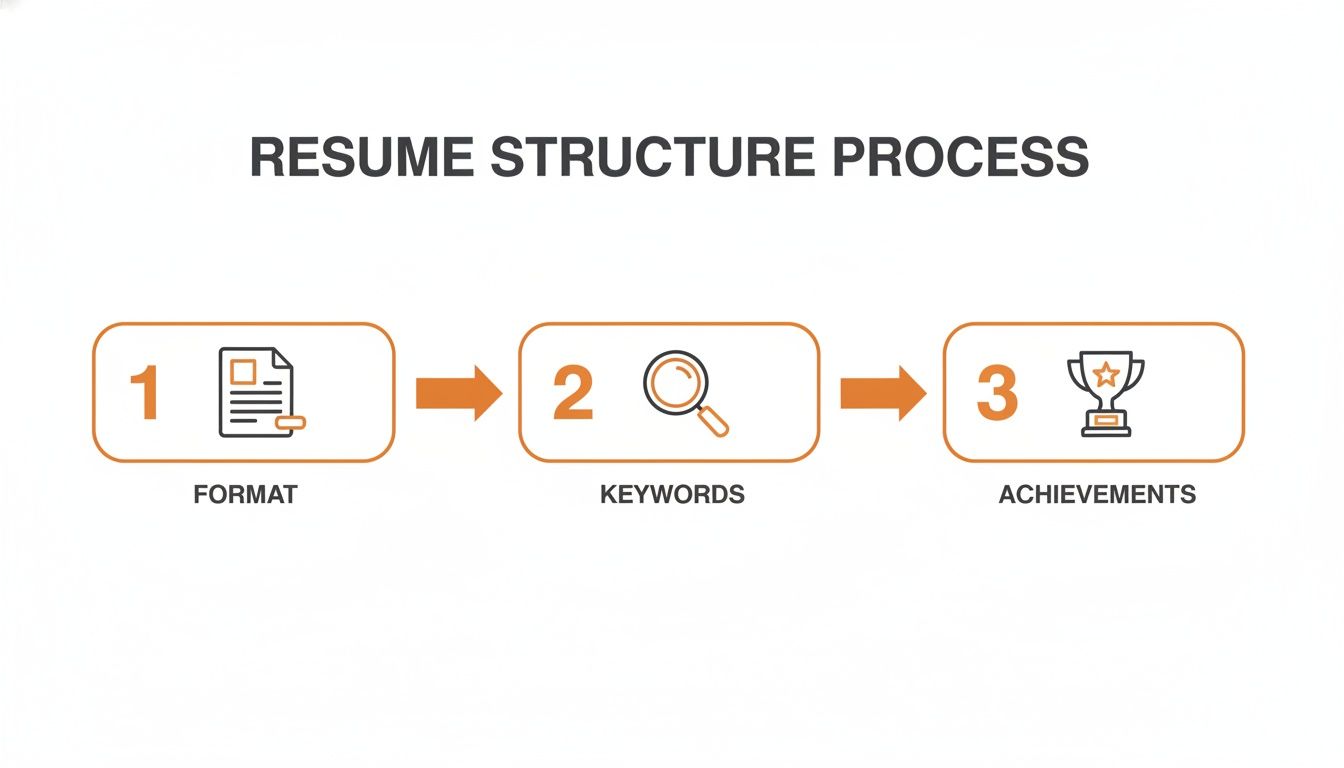
It’s all about a logical flow: clean formatting allows the keywords to be read, and those keywords give context to your powerful, achievement-based accomplishments.
Final Check: Critical Pitfalls to Avoid
After running an ATS check, it's time for one last manual review. I’ve seen countless applications get derailed by the same handful of preventable mistakes. Dodging these common tripwires will give you the confidence that your resume is truly ready for prime time.
Here are the biggest red flags I see all the time:
- Using “Creative” Job Titles: You may have been a "Growth Hacker" or a "Marketing Ninja," but an ATS is searching for standard titles like "Marketing Manager" or "Digital Marketing Specialist." Always tweak your title to match the job post or the closest industry-standard term.
- Hiding Key Info in Graphics: Remember, charts, logos, and images are totally invisible to an ATS. Make absolutely certain that every critical detail—especially your skills and contact information—is in plain text.
- Sending a One-Size-Fits-All Resume: Submitting the same generic resume for every opening is a surefire way to get rejected. Tailoring your document with keywords from each specific job description is non-negotiable for getting past the bots.
- Overlooking Simple Typos: An ATS won’t notice a spelling error, but you can bet the recruiter who reads your resume will. A simple typo can make you look careless, which is a dealbreaker for almost any role.
Let’s be crystal clear: just one of these mistakes can be the difference between landing an interview and getting an automated rejection email.
Think about it. If you’re applying for a "Senior Software Engineer" role, but your last company called you a "Lead Code Wizard," the ATS will likely fail to match your experience to the job’s seniority. You'll get a much lower score than you deserve, all because of a title.
It’s the same with skills. If the job requires "Asana" but your resume just says "project management software," you've missed a direct keyword match. That tiny detail can be enough to bump your application out of the running.
This final check is your chance to close those gaps and make sure your resume tells a clear, compelling story that aligns perfectly with the job you want.
ATS-Proofing Your Application Checklist
Before you submit any application, run through this final checklist. It’s a quick but essential step to ensure your resume is ready to impress both the ATS and the hiring manager.
| Check Item | Why It Matters for ATS | Pass / Fail |
|---|---|---|
| Submitted as .docx or .pdf | These are the most universally accepted and parsed file types. | |
| No Tables or Columns | Multi-column layouts can confuse parsers, jumbling your information. | |
| Standard Fonts Used | Fonts like Arial, Calibri, or Times New Roman ensure readability. | |
| No Images or Graphics | ATS cannot read text embedded in images, charts, or logos. | |
| Standard Section Headings | Use clear headings like "Work Experience" and "Skills," not creative ones. | |
| Keywords from Job Description Included | The ATS scores your resume based on keyword matches for skills and duties. | |
| Job Titles Match Industry Standards | A "Brand Evangelist" should be listed as "Marketing Manager" if that’s the standard. | |
| Contact Info is in Plain Text | Don't put your phone number or email in the header/footer section. | |
| Proofread for Typos | While the ATS doesn't care, the human recruiter who reads it next absolutely does. | |
| Ran Through an ATS Checker | Confirms that a machine can successfully parse your resume’s content. |
Completing this checklist gives you peace of mind. You'll know you’ve done everything possible to give your application the best shot at success.
Answering Your Top ATS Questions
Even after you’ve got a solid plan, a few nagging questions about Applicant Tracking Systems always seem to pop up. I get it. These systems can feel like a mysterious black box, but they’re a lot less intimidating once you understand the logic behind them.
Let’s tackle the most common questions I hear from remote job seekers. Getting clear, direct answers will give you the confidence to apply for any role, knowing you’ve given yourself the best possible shot. For a deeper dive into how these systems work behind the scenes, it’s worth understanding what an ATS is from the ground up.
Do I Still Need to Write a Cover Letter?
Yes. If the application gives you the option, you should absolutely write one.
It’s true that an ATS might not scan a cover letter for keywords in the same way it does a resume. But that’s missing the point. The cover letter isn't for the bot—it’s for the human who will eventually read your application. A great cover letter is your chance to tell a story and connect the dots for the hiring manager. It’s where you show real personality and enthusiasm for the role, things a resume just can’t convey.
With roughly 50% of recruiters still reading them, a compelling cover letter can be the one thing that pushes you to the top of the pile for a competitive remote job. Don't skip it.
How Long Should My Resume Be?
The old “one-page resume rule” is mostly a myth for anyone with significant experience. When it comes to an ATS, the quality of your content is far more important than the page count.
Here’s a simple rule of thumb I give to my clients:
- Entry-Level (0-5 years): Stick to one page. Be ruthless about cutting anything that isn't directly relevant to the job.
- Mid-Career (5-15 years): Two pages is the new standard. It's often necessary to properly detail your career growth and key accomplishments.
- Senior-Level (15+ years): Two pages is still ideal, but three is acceptable if you have extensive, highly relevant experience like patents, publications, or a long list of critical projects.
Never cut valuable, keyword-rich experience just to squeeze onto a single page. The ATS won’t notice the page count, but it will definitely notice the missing skills and qualifications.
Just make sure every single point on that second or third page is pulling its weight and is directly tied to the jobs you’re targeting.
Does Every Company Use an ATS?
It might feel that way, but not every single one does. However, the vast majority do. It's estimated that over 98% of Fortune 500 companies rely on an ATS. While the adoption rate is lower for small businesses, it’s growing fast as the technology becomes cheaper and easier to use.
Here’s the thing: you can’t tell from the outside if a company is using an ATS or not. So, your best strategy is to always assume they are. It’s much safer to submit an optimized, ATS-friendly resume to a company that doesn’t use one than to send a creative resume to a company that does.
Can I Use a Creative Resume for a Design Role?
This is the classic dilemma for designers, and it trips up so many talented people. As a graphic designer or UI/UX professional, a plain black-and-white document feels like a missed opportunity to showcase your skills. I completely agree, but you have to play the game strategically.
The solution is simple: always have two versions of your resume.
- The ATS Version: This is your clean, simply formatted .docx file. It follows all the rules—standard fonts, clear headings, and keyword-rich text. This is the version you upload to every online job portal.
- The Portfolio Version: This is your beautifully designed, branded PDF that shows off your creative genius. You link to this on your portfolio site, share it directly with recruiters you connect with on LinkedIn, and bring it to your interviews.
You need the first one to get past the robot. You use the second one to wow the human. Don't let your amazing design skills get you filtered out before a person ever sees your work.
Ready to stop guessing and start applying with confidence? At YayRemote, we've built the free tools you need to optimize every application. Use our ATS Resume Checker to see exactly how your resume stacks up against any job description and ensure you have the keywords to get noticed. Find your next remote job smarter, not harder. Explore thousands of hand-picked remote roles at https://www.yayremote.com.