Remote Work for Travelers: Ultimate 2026 Guide
Explore the world with our ultimate guide to remote work for travelers. Find jobs, visas, & essential tips for a successful digital nomad life in 2026.
You're probably reading this in one of two moods. Either you're stuck in a routine that feels smaller than your ambition, or you already know you want a travel-friendly career and need a practical way to make it work without wrecking your income, your reputation, or your sanity.
That's the core distinction in remote work for travelers. The fantasy is simple. Open laptop, face ocean, cash paycheck. The actual experience is better, but only if you build it correctly. Jobs, visas, internet backup, time zones, money systems, and gear all matter. Miss one and the whole setup gets shaky.
The good news is that this path is no longer fringe. It's a workable professional model for people who treat it like one.
The Dream of Working from Anywhere Is Now Reality
A lot of people start here. You're at your desk, doing solid work, and wondering why that work has to happen in the same chair, in the same building, in the same city, every day. You don't want to quit your career to travel. You want your career to travel with you.
That used to sound unrealistic to most employers. It doesn't anymore.
A peer-reviewed analysis found that the U.S. share of workers working from home rose from 4.7% pre-pandemic to 32.2% during the first year of the pandemic, roughly a six-fold increase, and nearly 35% of U.S. households adopted working from home during that period, according to Telecommuting and Travel during COVID-19. That shift matters because it changed what companies, managers, and workers consider normal.
Remote work stopped being a special perk for a narrow slice of people. It became part of how work is organized.
Practical rule: The office is no longer the default. Your ability to travel now depends less on whether remote work exists and more on whether you can find the right role and operate reliably inside it.
For travelers, that changed everything. People could extend trips instead of burning all their leave at once. They could test a city before moving. They could choose destinations based on internet quality, visa rules, and team overlap instead of commuting distance.
That doesn't mean every job fits the lifestyle. Some jobs still require fixed hours, secure environments, or heavy real-time collaboration. Some managers say “remote” but expect office-style availability from anywhere on earth.
The opportunity is real. The filter matters.
Understanding the Remote Travel Landscape
Not every traveler working online is doing the same thing. If you don't define your model clearly, you'll apply for the wrong jobs, choose the wrong destinations, and set the wrong expectations with your employer.

Three common models
Think of these as different travel styles.
| Model | What it looks like | Best for | Main trade-off |
|---|---|---|---|
| Digital nomad | You move between cities or countries while keeping location-independent work | People who want flexibility and can manage logistics often | More planning, more legal and routine friction |
| Workation traveler | You work remotely from one destination for a limited stretch | Employees testing the lifestyle without major change | Easier to handle, but less freedom |
| Remote employee with travel flexibility | You keep a stable base and travel around work windows | Professionals who want consistency and occasional mobility | Travel happens around the job, not the other way around |
The mistake most beginners make is assuming they need to become a full-time nomad immediately. They don't. A short workation is often the smarter first move. It shows you how you handle internet issues, focus, accommodation, and timezone stress before you commit to constant movement.
How to choose the right model
Use your job as the starting point, not your dream destination.
- If your work is meeting-heavy, a stable base with occasional travel is usually easier.
- If your work is output-driven, long stays in one place can work very well.
- If you're still proving yourself remotely, temporary travel is safer than a full nomadic leap.
- If you already manage asynchronous work well, location independence becomes much more realistic.
A useful analogy is this: a backpacker, a vacationer, and an expat all travel differently. The same applies to remote workers. One person hops often, another settles for a month, and another keeps one base while traveling selectively. None is “more real” than the others.
If you're considering road-based travel, the daily realities of power, space, storage, and maintenance matter more than social media suggests. These valuable tips from RVupgrades.com are worth reading because they focus on how full-time mobility affects daily living.
A travel-friendly career works best when your work model and travel model match. Most problems start when they don't.
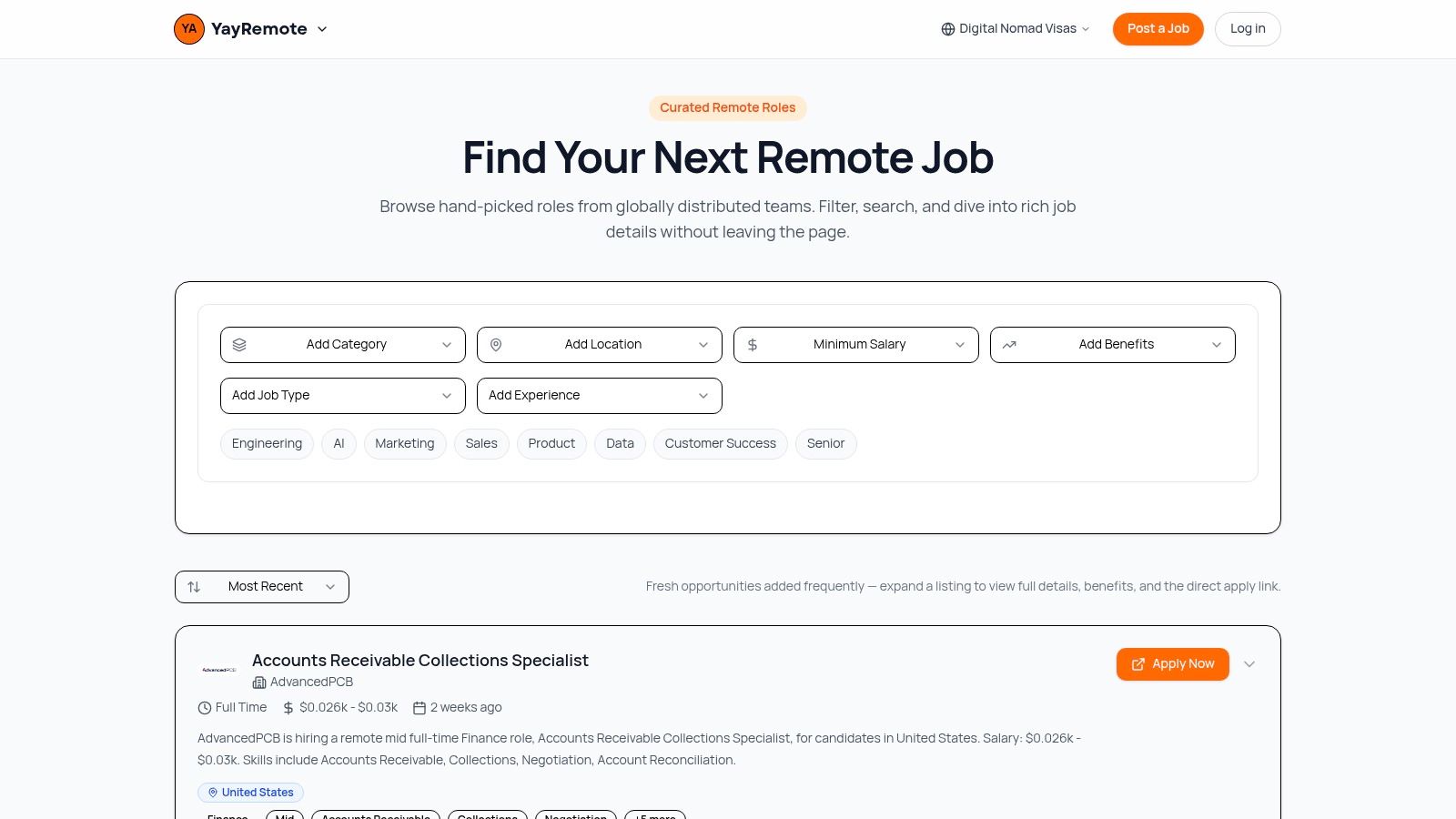
Finding Your Ideal Remote Travel Job on YayRemote
The first job that lets you work outside an office isn't automatically the right one for travel. You need a role that's remote by design, not remote by exception.
That changes how you search.
Start with travel-compatible job categories
Some roles tolerate movement better than others. In practice, these categories tend to translate well to remote work for travelers:
- Engineering and AI roles often reward deep work, written communication, and deliverables over physical presence.
- Design and product work can fit well if the team has clear review cycles and documented processes.
- Marketing and content roles are often flexible, especially when performance is tied to campaigns, systems, and assets rather than fixed office hours.
- Data roles can work well for travelers when access requirements are clear and the company supports distributed workflows.
- Customer success and sales are possible, but you need to be stricter about timezone fit because live calls matter more.
The point isn't to chase a title that sounds nomadic. It's to find a role where your value can be delivered consistently from different places.
Filter for the reality, not the label
A smart search starts narrow. Look for fully remote roles first, then narrow by function, experience level, and the type of company setup you can support while traveling.
When you review listings, check for signs of a mature distributed team:
- Clear communication expectations
- Written workflows
- Async-friendly processes
- Reasonable meeting cadence
- Transparency about location or timezone constraints
If you need help tightening your search strategy, this guide on how to find remote work is a useful companion because it pushes you toward fit, not volume.
Use your resume like a matching tool
A lot of applicants undersell the exact skills that make them good remote hires. They focus on years of experience and forget to surface what matters for distributed teams: self-management, documentation, stakeholder communication, async collaboration, and tool fluency.
That's where a Skills Analyzer becomes useful. Compare your background against the role, identify missing language, and close the gap before you apply. Don't stuff keywords into your resume. Translate your actual work into the language the employer is scanning for.
For example, “managed client projects” is vague. “Coordinated deadlines across Slack, Zoom, and Asana” tells a remote team you already know how work moves without hallway conversations.
Your resume should prove two things at once. You can do the job, and you can do it without supervision in the same room.
Timezone overlap should decide more applications than it does
A lot of people choose a destination first and only later realize they've built a workday that starts at night and ends after midnight. That's survivable for a week. It's not a good life.
Guidance for distributed teams emphasizes a fixed overlap window for live collaboration, with productivity depending less on constant availability and more on clear latency tolerances and a predictable overlap window, as noted by Ambitions Travel Recruitment.
That means a timezone overlap tool isn't a nice extra. It's part of job selection.
Before applying, test questions like these:
- How many live meetings does the role require?
- What hours must overlap with the team?
- Can you sustain those hours from your target destination?
- Will this still work if you move again?
A role can be excellent on paper and still be a bad fit for travel if your schedule becomes physically draining.
A quick visual walkthrough helps if you prefer to see how remote job search platforms are used in practice.
What works and what usually fails
Here's the blunt version.
What works
- Applying selectively to roles built for distributed teams
- Optimizing your resume for remote execution, not just technical skill
- Choosing companies whose collaboration rhythm matches your intended travel pattern
- Treating timezone fit as part of compensation, not a side issue
What usually fails
- Applying to every “remote” role without checking location rules
- Assuming travel flexibility means total schedule freedom
- Picking destinations that force unsustainable meeting hours
- Hiding your actual working pattern instead of planning it transparently
The best remote travel jobs aren't just portable. They're operationally compatible with the way you want to live.
Navigating Visas and Legal Requirements
In this area, many otherwise capable travelers get sloppy. They sort the laptop, the flights, and the accommodation, then treat legal status as a vague detail they'll “figure out later.”
That's backwards.
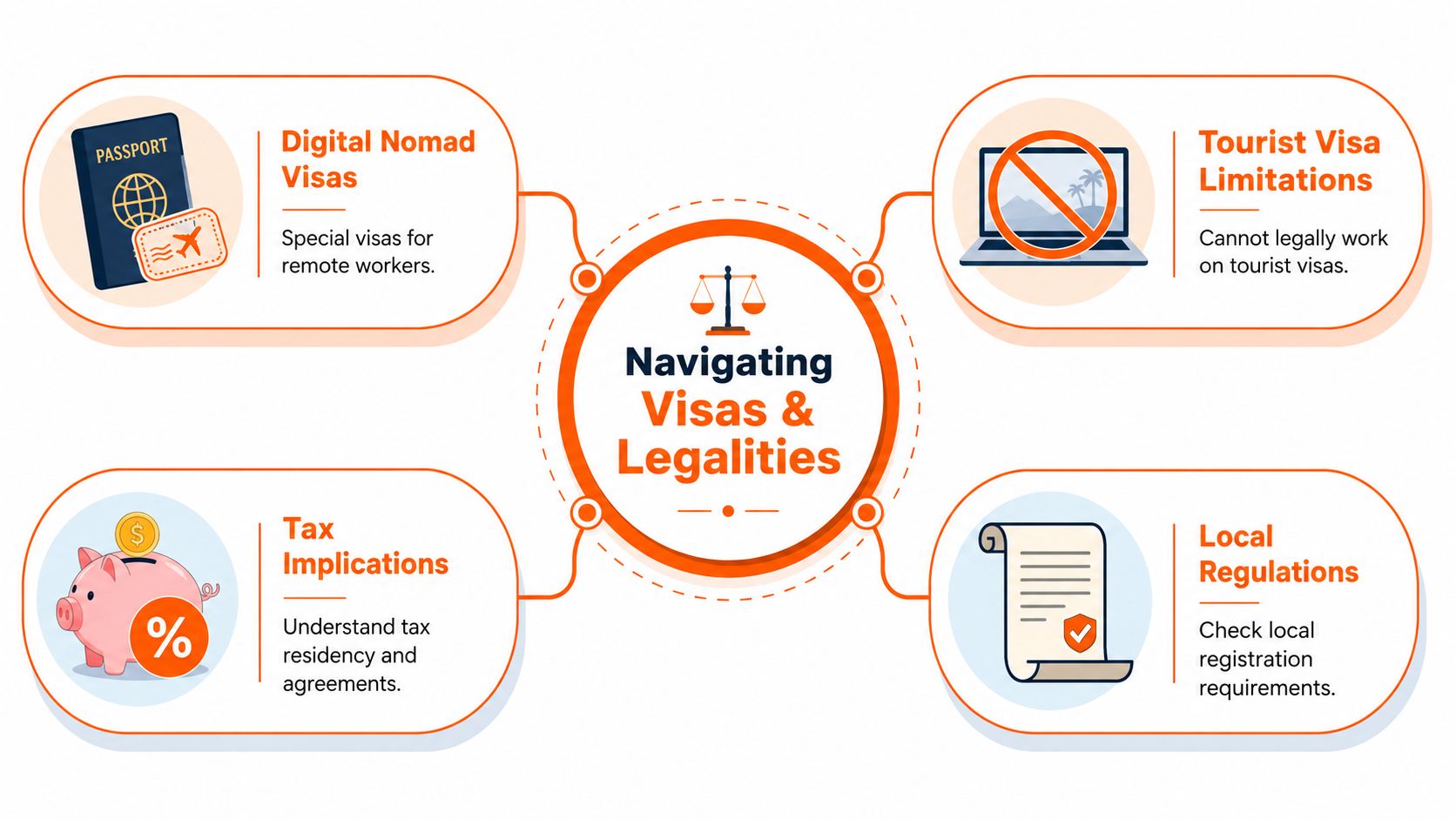
Tourist visa versus digital nomad visa
These are not interchangeable.
A tourist visa is designed for tourism. People often assume quiet laptop work from an apartment or hotel sits in a harmless gray area, but that assumption can be risky. Rules differ by country, and what feels informal to the traveler may still conflict with local immigration terms.
A digital nomad visa is different. It creates a formal path for remote workers to stay longer and work under a framework designed for that purpose.
That distinction matters because countries are now treating remote workers as a recognizable visitor segment, not an odd edge case. ForwardKeys reports that Japan introduced a Digital Nomad Visa in March 2024, after a February 2024 announcement, and that the move triggered a visible surge in one-way flight searches, according to its analysis of remote work and digital nomad travel. Policy changes shape where remote workers can realistically go.
The legal checklist that actually matters
Don't try to memorize every country's rules. Build a repeatable review process.
Visa category
Check what entry route applies to your purpose. Tourism, remote work, self-employment, and local employment are different buckets.Length of stay
Your work rhythm changes depending on whether you can stay briefly or settle into a place long enough to build routine.Income and document requirements
Many visa routes require proof of employment, income, insurance, or accommodation.Local compliance
Some destinations have registration, address reporting, or other local administrative rules after arrival.
A good destination isn't just attractive. It's administratively manageable.
Tax exposure is where short trips become long-term problems
Many travelers know the phrase “183-day rule,” but they use it too casually. It's a useful warning sign, not a complete tax strategy. Tax residency depends on the rules of the countries involved, your duration of stay, and the wider facts of your situation.
That means you should treat taxes as a planning issue the moment your travel becomes regular, extended, or multi-country.
If you're moving often, keep a clean record of entry dates, exits, and working periods. Messy travel records create avoidable stress later.
A practical way to reduce confusion is to keep one running log with:
- Country entered and exited
- Purpose of stay
- Visa used
- Work arrangement during the stay
- Any registration or compliance steps completed
If you want a destination-by-destination starting point, this guide to digital nomad visa requirements is useful because it helps you compare legal pathways instead of guessing.
What careful travelers do differently
They don't rely on forum hearsay. They don't assume one country's rules apply to another. And they don't confuse convenience with compliance.
They also choose fewer destinations at first. Long stays are usually easier legally, professionally, and mentally than constant border hopping. You get time to settle in, understand the local setup, and avoid making decisions at airport speed.
The travel lifestyle feels freer when the paperwork is handled properly. Until then, it's just uncertainty with better scenery.
Staying Productive and Connected Anywhere
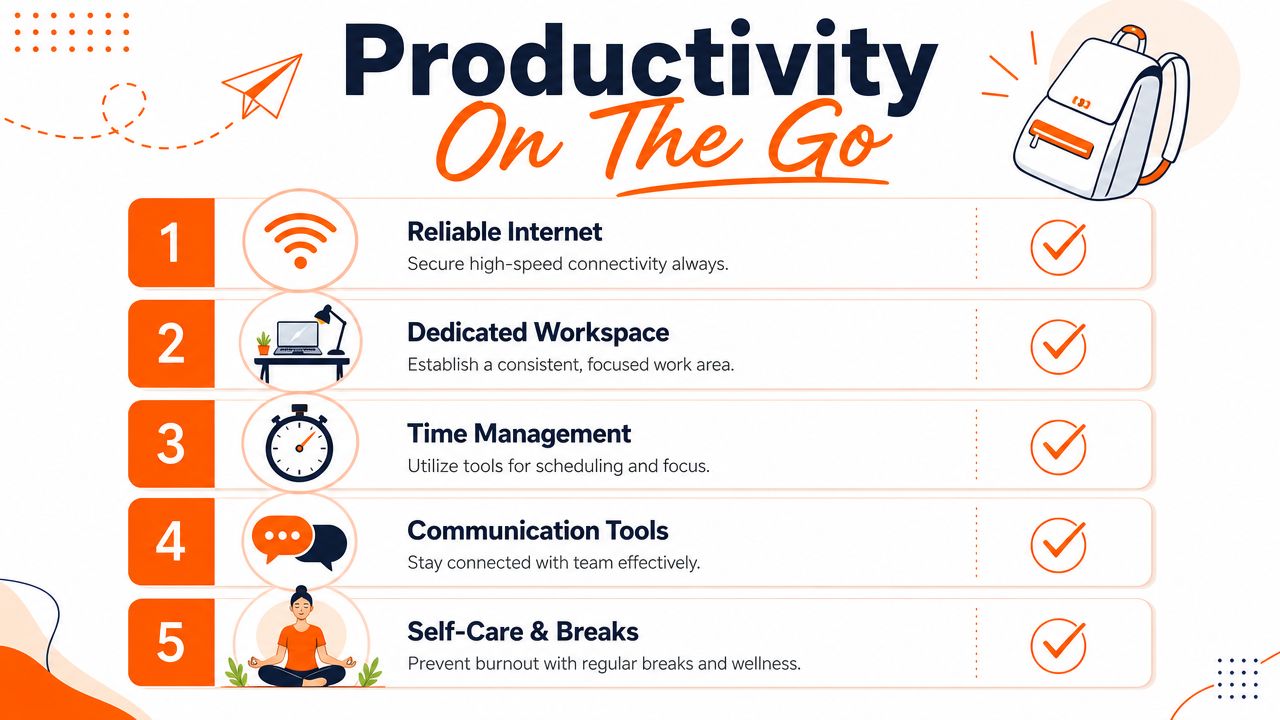
Productivity on the road is often attributed to discipline. It is, but not as typically defined. The core issue is system design. If your setup depends on perfect Wi-Fi, perfect focus, and perfect energy every day, it will fail.
Reliable remote work for travelers needs redundancy.
Build your connectivity stack first
The core technical constraint for remote travel is connectivity. Practical guidance emphasizes using mobile hotspots as backup and secure connections like VPNs, since weak or unstable internet directly reduces availability and increases security risks, according to this remote work while traveling guide from Fora.
That leads to a simple rule. Never rely on one connection.
A practical setup usually looks like this:
Primary connection
Apartment, hotel, coworking space, or local broadband.Backup connection
Mobile hotspot, tethering plan, or travel data option.Security layer
VPN, device protection, and caution around public networks.
If you're moving between countries, getting instant data for international travel can make the backup layer much easier to manage, especially when you land before your accommodation Wi-Fi proves itself.
Design a routine that survives movement
People often fail at this because they try to recreate a perfect home-office day while changing cities, beds, and time zones. That won't hold.
Use a smaller system.
| Daily element | What to standardize | Why it matters |
|---|---|---|
| Start of day | Same login sequence, messages, and task review | Reduces decision fatigue |
| Workspace | One reliable setup pattern | Helps your brain switch into work mode |
| Meeting window | Fixed overlap period when possible | Protects collaboration |
| Deep work block | Reserved time away from transit and sightseeing | Preserves output quality |
You don't need a rigid life. You need repeatable anchors.
Communication beats hustle
Travelers sometimes overcompensate by being “always on.” That's a mistake. Constant availability doesn't build trust. Consistent delivery does.
Set expectations early. Tell your team when you'll be online, when you're in focus mode, and what channel to use for urgent issues. Put key hours in your calendar. Use Slack, Zoom, Google Workspace, Asana, or Trello in a way that separates urgent communication from task tracking instead of mixing everything into chat.
For a broader setup checklist, these tools for remote work are a solid reference point because they help you think in systems instead of isolated apps.
Good remote performance is boring in the best way. People know when you're reachable, your work arrives on time, and internet problems don't become team problems.
What doesn't work for long
A few habits look manageable early on but usually break down:
- Working from noisy public spaces for important calls
- Booking accommodation before checking internet details
- Using unsecured Wi-Fi for sensitive work
- Trying to sightsee all day and “catch up” at night
- Moving too often to build any rhythm
The sustainable version of this lifestyle is less glamorous than people expect. It's also much better. You get freedom without constant chaos.
The Traveler's Essential Tech and Gear Guide
A good travel work kit isn't about owning more gear. It's about carrying the smallest setup that still lets you do your job well under imperfect conditions.
That means every item needs a reason to be in your bag.
Laptop choice is a weight versus workload decision
If your work lives in browser tabs, documents, meetings, and light creative tools, a lighter machine usually wins. You'll carry it through airports, up stairs, across cobblestones, and into cramped apartments. A little less power often feels worth it.
If you work in development, video, large design files, or heavy data environments, performance matters more. In that case, the right choice may be a slightly heavier laptop that removes friction from your actual job.
Use this filter:
- Choose lighter if mobility is constant and your workload is modest.
- Choose stronger if lag, crashes, or thermal issues would hurt your daily output.
- Choose durable if you're moving often and can't baby your equipment.
Second screen versus simpler bag
A portable second monitor can improve comfort and layout, especially for spreadsheets, design review, or research-heavy work. The trade-off is simple. Better workflow, more bulk.
Some travelers skip it and use a tablet as a second screen. Others decide that a single-screen setup with tighter window management is worth the lighter bag. Neither answer is universal.
A short comparison helps:
| Gear choice | Upside | Downside |
|---|---|---|
| Portable monitor | Better multitasking and visual space | Extra weight and cable clutter |
| Tablet as second screen | Multi-use device, lighter than a monitor | Can be less stable or less ergonomic |
| No second screen | Simplest, lightest setup | More app switching and less workspace |
Audio and power matter more than people think
A strong headset solves two problems at once. It improves call quality for your team and protects your focus in apartments, trains, cafés, and coworking spaces. Don't treat it as optional if your job includes meetings.
Power gear deserves the same attention. Carry a universal adapter, the charging brick your laptop needs, and a compact cable setup you trust. Cheap adapters and flaky cables create the kind of stupid failure that can ruin a workday.
Ergonomics are part of performance
The fastest way to make travel work harder than it needs to be is to ignore your body. Kitchen chairs, low tables, couches, and beds are fine for occasional use. They're poor choices for full workweeks.
A compact kit can help:
- Portable laptop stand for screen height
- Small external keyboard for wrist position
- Travel mouse if trackpads slow you down
- Light pouch to keep cables and adapters organized
The right gear is the gear that helps you do your work with less friction. Not the gear that looks impressive in a packing video.
Managing Money and Safety on the Road
People often over-plan flights and under-plan the systems that protect them once they land. Money and safety need repeatable habits, not occasional attention.
That starts before the trip.
Build a financial setup that travels well
Your bank should not punish you every time you cross a border. Look for accounts and cards that are workable internationally, easy to monitor online, and simple to freeze or replace if something goes wrong.
Keep your money structure separate by purpose:
- Primary spending account for daily use
- Backup card or account stored separately
- Emergency reserve you don't touch casually
That separation helps when a card is blocked, an ATM eats one, or a fraud alert interrupts access.
Track expenses while traveling the same way you would in a normal month. Don't rely on memory. Use a note, spreadsheet, or finance app and review it regularly. Long-term travel becomes expensive fastest through small repeated leakage, not dramatic blowups.
Insurance is boring until you need it
A short vacation policy and longer-term travel medical coverage are not always the same thing. If you're working while abroad, reading the terms matters. You want to know what's covered, how claims work, and whether the policy fits the way you're traveling.
It's easy to delay this because it feels administrative. Don't. The practical version of freedom includes risk transfer.
The safest trip is rarely the one with the best itinerary. It's the one with backup options already in place.
Digital security is personal safety now
For remote workers, losing a device or exposing company data isn't just a tech issue. It can affect your job.
Basic habits do a lot of heavy lifting:
- Use a password manager so you're not recycling weak logins
- Turn on device encryption where available
- Enable two-factor authentication
- Lock screens quickly in public spaces
- Keep work devices physically close, especially in transit
Public Wi-Fi deserves extra caution. If you must use it, use your security tools and avoid casual handling of sensitive work.
Street-level safety still matters
Most bad experiences on the road are ordinary, not cinematic. Overpriced taxis, distraction theft, fake urgency, and “helpful” strangers pushing you into a bad transaction are more common than dramatic danger.
A few habits go a long way:
- Arrive with your route from airport to lodging sorted out.
- Don't flash devices or cash when you're tired and disoriented.
- Keep copies of important documents stored securely.
- Tell someone you trust where you are when you move between places.
The goal isn't paranoia. It's reducing obvious vulnerabilities. The more stable your money and safety systems are, the more mental space you have for work and actual travel.
Your Next Steps to a Travel-Friendly Career
The biggest shift isn't learning how to book flights while employed. It's learning to think like someone who runs a portable professional life.
That means choosing a work model that matches your real habits. It means finding roles designed for distributed teams instead of chasing any job with a remote label. It means treating visas, tax exposure, and compliance as part of planning. And it means building a routine that can survive bad Wi-Fi, movement, and changing time zones.
A practical launch checklist
If you want a clean starting point, use this:
Pick your model
Decide whether you want occasional workations, a stable remote base with travel, or a more nomadic setup.Target the right roles
Focus on job categories and companies that already operate well across distance.Test timezone fit early
Don't assume you'll “make it work” later. Check live collaboration demands before you apply.Sort the legal side before departure
Choose destinations you can understand and comply with.Build your mobile office
Laptop, audio, power, backup internet, and a basic ergonomic setup come first.Lock in money and safety systems
Backup cards, expense tracking, insurance, and digital security should be routine.
What makes this sustainable
The people who last in remote work for travelers don't chase constant novelty. They protect their ability to keep earning. They choose accommodations with work in mind. They move at a pace that leaves room for focus. They know when to stay longer and when a destination doesn't fit their schedule.
That's the part many beginners miss. Travel gets better when work is stable. Work gets easier when travel is realistic. The goal isn't to blur the two into one endless vacation. The goal is to build a life where both can coexist without constantly sabotaging each other.
Start with one concrete step. Not ten. Update your resume for remote roles. Define your acceptable timezone range. Choose a first destination you can manage legally and professionally. Then move from idea to execution.
If you want one place to support that process, YayRemote is a strong starting point. You can search hand-picked remote jobs, assess your fit with the Skills Analyzer, improve applications with resume tools, evaluate schedule fit with Time Zone Overlap, and research destinations through its digital nomad visa resources. That's useful because remote work for travelers isn't one decision. It's a chain of decisions, and the right platform helps you make each one with less guesswork.